Today’s digital transformation landscape requires organizations to manage an increasingly complex portfolio of software applications. To address this challenge, system integration connects diverse hardware and software components into a cohesive operational ecosystem.
Strategically linking these technological assets enables continuous data exchange across business functions. A unified architecture helps eliminate data silos and reduce operational bottlenecks caused by disconnected systems.
Financial services organizations and other highly competitive industries rely on this interconnected structure to support data-driven decision-making. A well-designed integration strategy enables sustainable business growth while adapting to evolving regulatory requirements.
Below, we explore the primary business benefits of system integration.
What are the benefits of system integration?
Connecting diverse software applications transforms a fragmented IT environment into a strategic corporate asset. The key advantages for your organization include:
Increased efficiency and cost reduction
One of the most immediate benefits is the ability to streamline routine operations. Integrated systems eliminate the need for manual data entry across multiple applications.
For example, financial services firms can connect customer relationship management platforms directly to accounting software, automating monthly invoice generation. These optimizations typically lead to lower operating expenses, particularly by eliminating redundant processes and reducing maintenance efforts.
Data centralization and better decision-making
A unified data repository gives business leaders clear visibility into organizational performance. Cross-functional teams can access synchronized information without switching between isolated systems.
Reliable insights emerge when data flows seamlessly across departments in real time. Executives can make more strategic decisions when working with accurate, consolidated information.
Process automation and scalability
Interconnected architectures create the foundation for efficiently automating complex business workflows. This technical framework enables organizations to achieve several operational advantages:
- Faster execution of routine administrative tasks
- Easier adoption of modern cloud applications
- Greater agility in responding to market changes
Your organization can scale operations without encountering bottlenecks caused by disconnected applications. As business requirements evolve, integrating new tools becomes significantly more manageable.
Compliance, information security, and risk mitigation
Centralized IT environments simplify the enforcement of security protocols across connected applications. Consistent data governance supports compliance with strict regulatory frameworks in industries such as pharmaceuticals and life sciences.
With integrated systems, unified access controls reduce vulnerabilities typically found in disconnected software components. This approach enables the creation of robust audit trails that strengthen your organization’s risk management strategy.
Read more: What is ITSM and why it is important
What are the main integration architectures and methods?
Organizations can adopt different architectural models to connect their digital assets, depending on operational requirements. The appropriate framework depends on the complexity of the existing IT infrastructure and future scalability needs.
The primary system integration methods include:
Point-to-point integration
This method establishes direct connections between two specific software applications to enable data exchange. While relatively simple to implement initially, managing multiple direct connections becomes increasingly complex as the number of systems grows.
Hub-and-spoke model
A centralized messaging hub acts as an intermediary layer that routes communication between disconnected subsystems. This architecture enhances security and simplifies oversight.
However, the central hub can become a performance bottleneck under heavy workloads.
Enterprise service bus (ESB)
This framework uses a dedicated middleware subsystem equipped with integration mechanisms for each connected application. It allows individual components to be replaced without disrupting the entire ecosystem, making it well suited for large-scale enterprise environments.
Essential connectors: APIs, middleware, webhooks, and EDI
Various technologies act as bridges between previously disconnected software components. IT teams use these connectors to standardize data transmission across application environments:
- Application programming interfaces (APIs) enable software modules to interact and exchange data in standardized formats.
- Middleware functions as a software layer that manages data handling and translation between distributed systems.
- Webhooks provide real-time HTTP callbacks triggered by specific events within a source application.
- Electronic data interchange (EDI) supports standardized exchange of business documents such as invoices and purchase orders.
Custom integration solutions often combine these technologies to meet specific operational requirements. Together, they ensure seamless data flow between legacy systems and modern cloud applications.

What technologies and tools should you use to connect ecosystems?
Organizations rely on specialized platforms to establish secure and reliable communication channels between distributed software applications. Integration tools vary in complexity and deployment models, addressing different technical capabilities and architectural requirements.
Integration platform as a service (iPaaS)
Cloud-based integration platforms provide an accessible interface for configuring connections through prebuilt templates and visual workflows. This service model automates data transformation and routing, reducing the need for custom code when integrating standard applications.
Hybrid integration platform (HIP)
Hybrid platforms offer built-in capabilities to synchronize on-premises legacy infrastructure with modern cloud systems. These environments use protocol connectors and message transformation tools to manage communication across fundamentally different IT architectures.
Robotic process automation (RPA) and unified APIs
Additional tools address specific technical limitations when traditional middleware cannot establish direct communication between applications. IT departments often implement the following solutions depending on the available software interfaces:
- Robotic Process Automation. Uses customized scripts to interact with software at the user interface level when native APIs are unavailable.
- Unified APIs. Consolidate multiple external endpoints into a single aggregated interface, simplifying the development of large-scale integration networks.
The choice among these technologies depends on your organization’s technical debt and long-term strategy. Selecting the right toolset is critical to ensuring stable data flows and minimizing ongoing maintenance demands on your engineering team.
Continue reading: The 11 best ITSM software solutions for your business in 2025
What are the common challenges in system integration and how can you overcome them?
Merging distinct IT environments . Addressing these barriers systematically ensures that information is shared accurately and consistently across your corporate infrastructure.
1. Legacy systems and technological compatibility
Older applications often do not support modern communication protocols or standardized data formats. Connecting these outdated architectures to newer cloud-based systems requires careful middleware configuration or the development of custom interfaces.
2. Security concerns and vulnerabilities
Integrating multiple applications expands the potential attack surface, particularly when security protocols differ across systems. The solution is to implement role-based access controls and consistent encryption standards.
This approach mitigates the risk of unauthorized access and protects sensitive personal and corporate data from breaches.
3. Limited specialized talent and cost management
Organizations frequently struggle to find professionals with deep expertise in both legacy hardware and modern cloud environments. Budget overruns often occur when projects rely excessively on custom development instead of leveraging adaptable middleware platforms.
What steps should you take to implement successful system integration?
Building a unified digital ecosystem requires minimizing disruption to daily operations. To achieve this, IT departments follow structured implementation phases that align technical initiatives with broader organizational objectives.
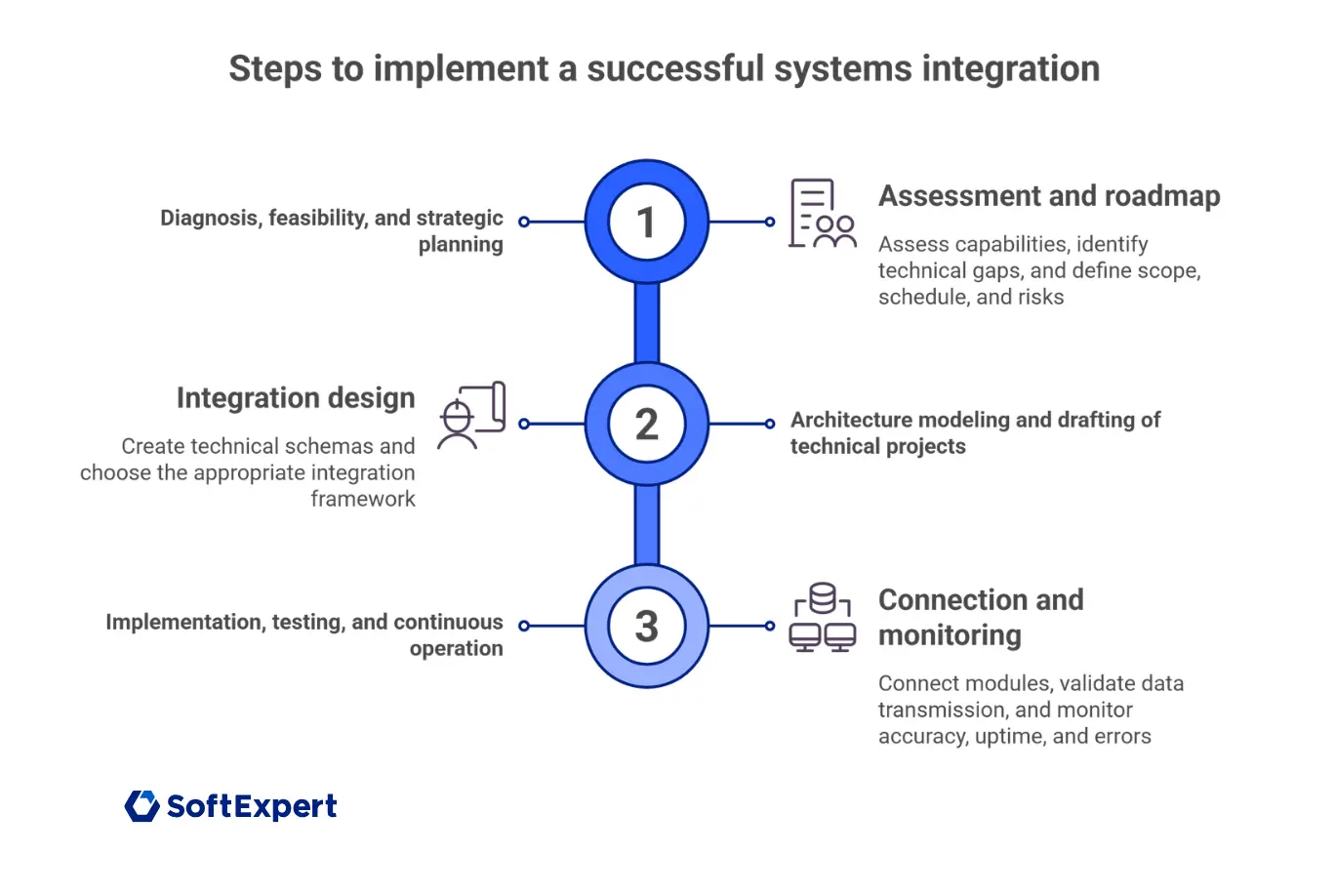
1. Assessment, feasibility, and strategic planning
Begin with a thorough evaluation of your current capabilities to identify technical gaps between existing systems and future business requirements. Teams should define a clear roadmap outlining project scope, timelines, and potential operational risks.
2. Architecture modeling and technical design
Engineers then develop technical blueprints detailing how different subsystems will interact and exchange information. This design phase determines the most appropriate integration framework.
Depending on your needs, the best option may be a centralized hub model or an enterprise service bus architecture.
3. Implementation, testing, and ongoing operations
The implementation phase involves connecting separate modules and validating data transmission under controlled conditions. Operations teams continuously monitor newly integrated systems to ensure that the following parameters remain stable:
- Data accuracy across connected application environments
- Uptime performance of core integration mechanisms
- Error logs generated by incompatible data formats

Read more articles like this:
- What is system implementation and how to avoid common mistakes
- Cloud security: learn how to safeguard your business
- Process automation explained: how to optimize and scale business workflows
Conclusion
System integration transforms fragmented software environments into unified operational networks that support sustainable business growth. Organizations that effectively connect their digital assets can respond to market changes with greater speed and precision.
Eliminating isolated data silos enables decision-makers to access consistent information across all corporate departments. This centralized approach supports a more intelligent operating model, where routine administrative tasks are reliably automated.
Modern IT environments will continue to require strong connectivity between legacy infrastructure and emerging cloud technologies. Investing in strategic integration frameworks helps organizations remain adaptable and resilient in an ever-evolving digital economy.
Looking for more efficiency and compliance in your operations? Our experts can help identify the best strategies for your company with SoftExpert solutions. Contact us today!
Learn more: ISO 27001 Standard: what it is, how to implement it and what are the requirements
FAQ: frequently asked questions about system integration
Below are the most common questions and answers about system integration:
A system integrator is a professional or company that connects disparate computer subsystems from different vendors. They design, test, and manage the technical infrastructure to ensure these components work together effectively.
Um integrador de sistemas é um profissional ou empresa que interliga subsistemas de computador díspares de vários fornecedores. Eles projetam, testam e gerenciam a infraestrutura técnica para garantir que esses componentes funcionem em conjunto.
B2B integration connects an organization’s internal IT infrastructure with that of its external business partners. This setup automates real-time data exchange for routine processes such as order fulfillment and invoicing.
An application programming interface (API) allows different software applications to communicate using predefined rules. It standardizes data exchange to enable seamless interactions across distributed systems.
Older applications that lack modern communication protocols are connected to cloud-based software using specialized middleware. This approach extends the lifespan of existing infrastructure while enabling modern digital capabilities.