With the beginning of the year, it’s time to plan activities, strategies, and goals for the coming months. So that you can complete this challenge with maximum efficiency, we have prepared a list of the eight best quality management software that your company needs to know.

What is software for quality management and control?
Initially, it is worth remembering what quality control software is: this type of tool is used to ensure that products/services meet established quality standards.
In practice, it helps to perform tasks such as identifying, monitoring, and correcting problems during the production process, thus strengthening quality management. In addition, quality control software (also called Quality Management System – QMS) can have features such as:
- Inspection and testing: Automate inspection and testing on products to ensure that they meet quality requirements (whether internal, from a regulatory body, or from a certification body such as ISO, for example).
- Document Management: Organize and manage quality-related documents, such as inspection reports and certificates of conformity.
- Data Analysis: Collecting and analyzing data from the operation to identify trends and areas that need improvement.
- Traceability: Track the production history of each item, allowing you to trace problems back to their origin.
- Internal Audits: Plan and execute quality audits to verify compliance with appropriate quality standards.
- Non-Conformance Management: Identify, record, and address non-conformities to prevent recurrences.
- Corrective and Preventive Actions: Implement actions to correct the problems identified and prevent them from happening again.
- Risk Management: Assess and mitigate risks that may affect the quality of products/services.
- Training and Qualification: Plan and record training stages to ensure that employees are qualified.
- Performance Indicators: Monitor key performance indicators (KPIs) to be able to assess the effectiveness of the QMS.
- Supplier Management: Evaluate and monitor the quality of suppliers and the inputs received from them.
- Reports and Analysis: Generate detailed reports that allow you to analyze the operation and make more qualified and strategic decisions.
Precisely because they can count on several resources that are so important for the implementation and maintenance of a good QMS, quality management software is widely used in heavily regulated industries. Some of the main ones are manufacturing, pharmaceuticals, food, and financial services.
How to choose the best quality management software
After understanding more about what this type of solution can offer your team and your company, it’s time to know how to choose quality management software.
There’s a wide variety of software on the market—from the simplest to the most complete—so it’s important to know where to start. More importantly, it is essential to define which criteria are important for your operation and for your type of company.
Choosing quality control software can be a challenging task, as there is no magic formula or definitive list of what is important. After all, this can vary greatly from company to company.
The good news is that, even so, there are some tips to help in this process that will guide you toward the best decision. Check it out below!
- Define your needs: Understand the specific needs of your business. What are the processes that need to be automated? And what are the main challenges for quality management and maintenance that you face? This first step will bring directions to your search.
- Check compatibility: Make sure that the software you are evaluating is compatible with the systems and tools you already use. Easy integration can save time and money and reduce complications. Prioritize those solutions with easy adaptation and integration to optimize the investment of time and resources in this type of tool.
- Essential functionalities: Have a list of essential functionalities that meet your needs. So, look for those solutions that are more qualified in these aspects. Some examples are management of non-conformities, internal audits, corrective and preventive actions, and data analysis.
- Ease of use: Don’t forget to consider that the software must be intuitive and easy to use — and not just by you, but by everyone who will use it. Ensure your team can adopt it quickly without the need for extensive and/or complicated training.
- Support and training: Still, some training or qualification may be necessary. Therefore, make sure that the solution provider offers adequate technical support and training. This is crucial primarily for resolving issues quickly and maximizing software usage.
- Cost-effective: Evaluate the cost of the software against the benefits it provides. To do this, consider not only the initial price, but also the costs of maintenance, updating, and the quantity and quality of the features it has.
- User Feedback: Research reviews and feedback from other users. This provides valuable insights into the effectiveness and reliability of the software.
- Demos and Trials: Finally, whenever possible, request a demo or use a trial version of the software. This allows you to see how the tool works in practice and assess whether it meets your expectations and needs.
By following these steps, you will be more prepared to choose a business quality control software that really guarantees the excellence of the products/services offered by your company.
Read also: 7 quality management trends and tools for 2026
8 Quality Control Software
Now it’s time to find out which quality control tools your company needs to know about in 2026. Packed with features, different areas of focus, and varied ways of working, the list below includes solutions that can address a wide range of needs.
The eight standout quality control software solutions for 2026 are:
- SoftExpert;
- Qualio;
- MasterControl;
- ETQ;
- DotCompliance;
- ComplianceQuest;
- Ideagen;
- JobBoss.
1. SoftExpert
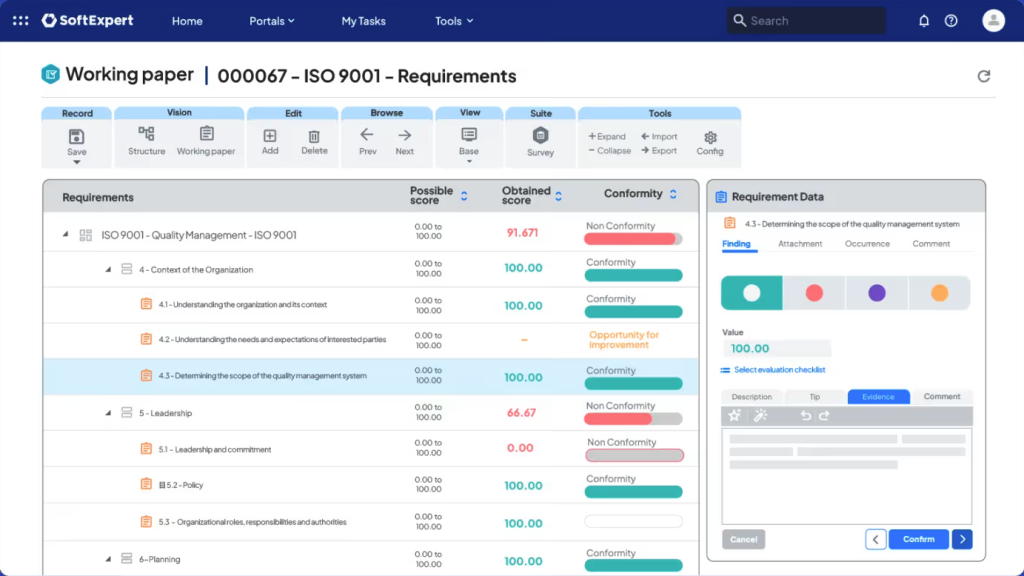
SoftExpert offers a robust solution for quality control and business processes called SoftExpert Suite. With it, you manage all your company (not just the quality area) on a single platform — now driven by AI.
This allows you to replace the various systems that are spread across the company with a single complete management platform. This way you gain performance, even when there is high regulation or specific needs of sectors/markets.
In quality management, SoftExpert Suite brings more agility and transparency and drives continuous improvement throughout your organization. It allows you to:
- Perform internal and external audits electronically;
- Create checklists based on your certification processes and standards;
- Manage the entire audit lifecycle;
- Track your results in real-time;
- Automate the evaluations of your suppliers based on pre-established criteria;
- Apply tools such as Ishikawa Diagram, 5 Whys, Pareto Diagram, Process Control Charts, among others;
- Use the 5W2H method to record corrective and preventive actions;
- View the schedule of activities through the Gantt chart;
- Monitor the execution of activities in real-time;
- Control calibration and maintenance plans on a single platform, with traceability of all your company’s instruments and equipment;
- Ensure that whenever a policy or procedure is reviewed, impacted users are trained on what’s new;
- Manage and eliminate deviations in processes, identify the root cause of non-conformities and define corrective and preventive actions;
- Create custom tests and quizzes that can be sent to attendees. collecting responses in real-time;
- Evaluate whether your organization’s processes are following the standards established by various quality reference standards;
- Transform raw data into relevant and actionable information, improving the quality of products and services;
- Identify and qualify suppliers, as well as deal with their risks, quality issues, delays in deliveries, and thus define a supplier qualification index;
- Organize meeting data, which speeds up the analysis of results and the breakdown of decisions made in action plans;
- Using Microsoft’s Copilot tool as an AI tool accelerates various activities, such as identifying quality risks, filling out forms, automatically creating action plans, and making decisions, all without the need for human intervention;
With so many resources, it’s no surprise that SoftExpert has more than 3,000 customers, and more than three million users, and is present in more than 50 countries with more than 300 partners.
Key Features
Process Modeling: Use the BPMN standard to create executable processes with a drag-and-drop interface.
Document Management: Organize and manage documents related to your processes.
Performance Indicators: Monitor KPIs to assess the effectiveness of processes.
Risk Management and Compliance: Assess and mitigate risks, ensuring compliance with standards and regulations.
Integration: Use it in an integrated way with other tools and systems.
Pros
Intuitive Interface: Easy to use, with a user-friendly and modular interface.
Comprehensive Features: Offers a wide range of features for different business needs.
Customer Support: It has responsive and helpful technical support.
Limitations
Learning Curve: Because it has many resources, it can be complex to learn and implement initially.
Pricing
Pricing Model: The price varies depending on the needs and size of the company.
Trial Version: You can check out a demo of SoftExpert Suite.
Platform Ratings
Capterra: Rated 4.6/5, with customers highlighting the richness of features and customer support.
G2: Rated 4.7/5, with customers highlighting the wide range of features and ease of use.

2. Qualio
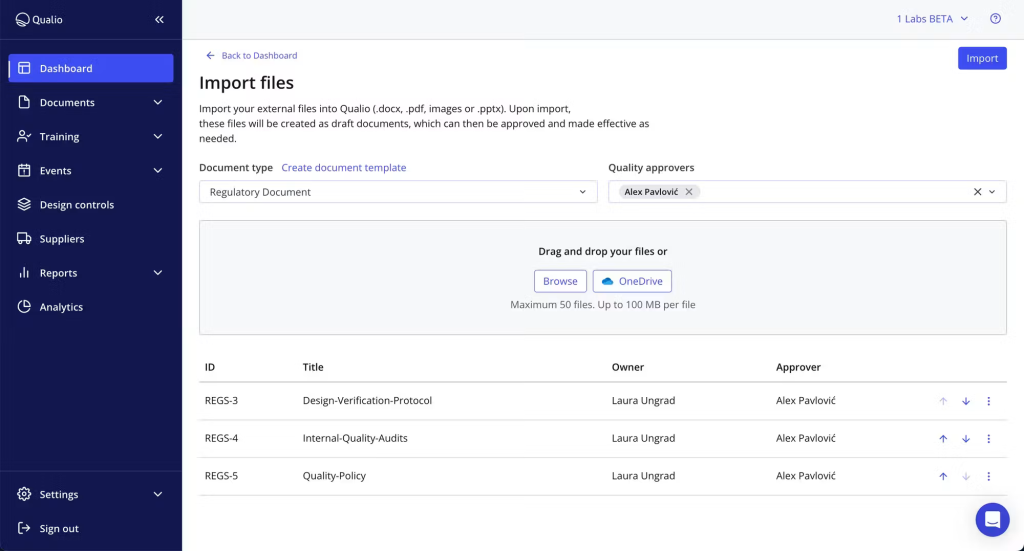
Qualio offers a cloud-based quality management solution (QMS) specifically for life sciences companies. Its focus is on software scalability, user experience, document management, and connectivity between collaborators/teams.
Key Features
Document Management: Control documents with approval flows, automatic reviews, and audit trails.
CAPA (Corrective and Preventive Actions): Manage deviations and implement corrective and preventive actions.
Training Management: Automate the creation, review, and management of training.
Compliance: Comply with FDA, ISO, and GxP regulations.
Pros
Ease of Use: Intuitive and easy-to-use interface with a quick learning curve.
Automation: Automating quality processes, reducing the time required for accreditation and approval.
Customer Support: Efficient technical support with a high satisfaction rate.
Cons
Focus on a specific sector: It is a quality control tool aimed at the Life Sciences sector. Therefore, it may not have the necessary resources for companies in other segments.
Lack of autonomy in audits: It does not allow the scheduling of audits, which can lead to errors and failures in the continuous improvement process.
Pricing
Pricing Model: Offers different plans, with Foundation, Growth, and Scale categories.
Trial: Provides a free trial version for evaluation.
Platform Ratings
Capterra: average rating of 4.6 out of 5 based on 124 reviews, highlighting ease of use and customer support, but mentioning cost as a negative point.
G2:average rating of 4.4 out of 5 based on 498 reviews. Users praise the automation and regulatory compliance, but also mention the initial complexity as a challenge and the price.
3. MasterControl
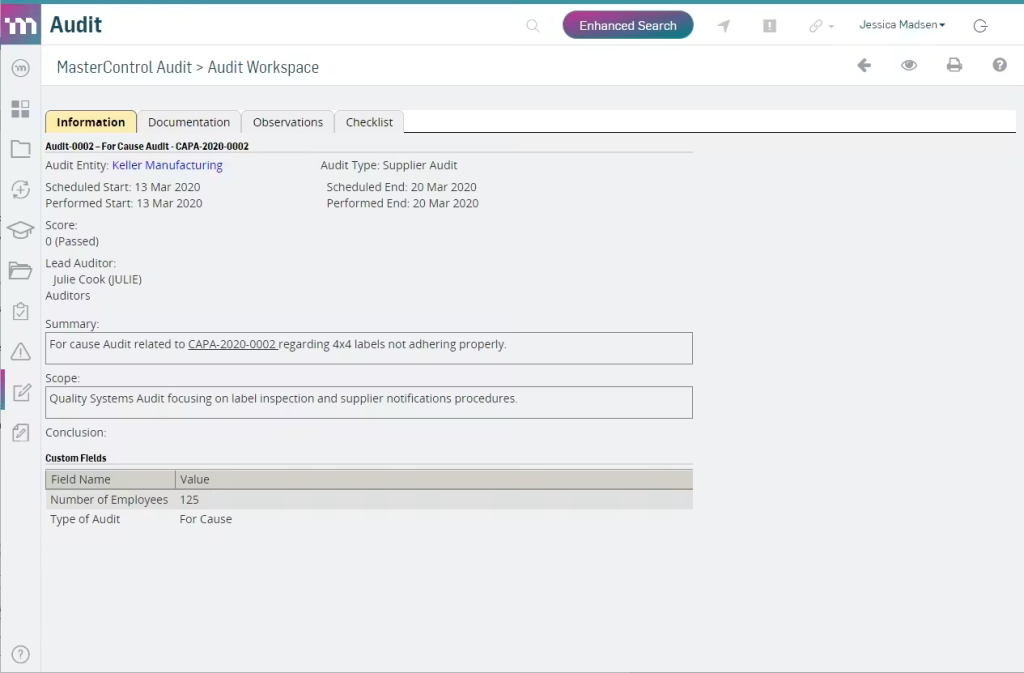
MasterControl offers a comprehensive quality management (QMS) and manufacturing execution (MES) solution with a focus on compliance. The solution is especially aimed at regulated industries, such as life sciences and pharmaceuticals.
Key Features
Document Management: Control documents with approval flows, automatic reviews, and audit trails.
CAPA (Corrective and Preventive Actions): Manage deviations and implement corrective and preventive actions.
Audits: Create and manage internal and external audit trails, with real-time tracking.
Training Management: Automate the creation, review, and management of quality training and events.
Compliance: Achieve compliance with FDA, ISO, and GxP regulations.
Electronic Production Records: Implement electronic production records (EBR/eDHR) for greater efficiency and traceability.
Pros
Ease of Use: Intuitive and easy-to-use interface, with adaptable processes and a fully integrated platform.
Automation: Automating quality processes, reducing the time required for accreditation and approval.
Online and up-to-date operation: Works in the cloud, eliminating the need for its own infrastructure. It features quarterly updates, monthly patches, and 24/7 global availability.
Cons
High Price: Considered expensive by some companies, especially smaller ones.
Focus on specific sectors: The solution is aimed at Life Science, which can leave companies in other sectors dissatisfied.
Steep learning curve: The use of the system is not very intuitive, which requires training.
Pricing
Pricing Model: Offers three plans: Base, Standard, and Complete.
Platform Ratings
Capterra: Average rating of 4.5/5 based on 422 reviews.
G2: Average rating of 4.4 out of 5 based on 525 reviews.
4. ETQ
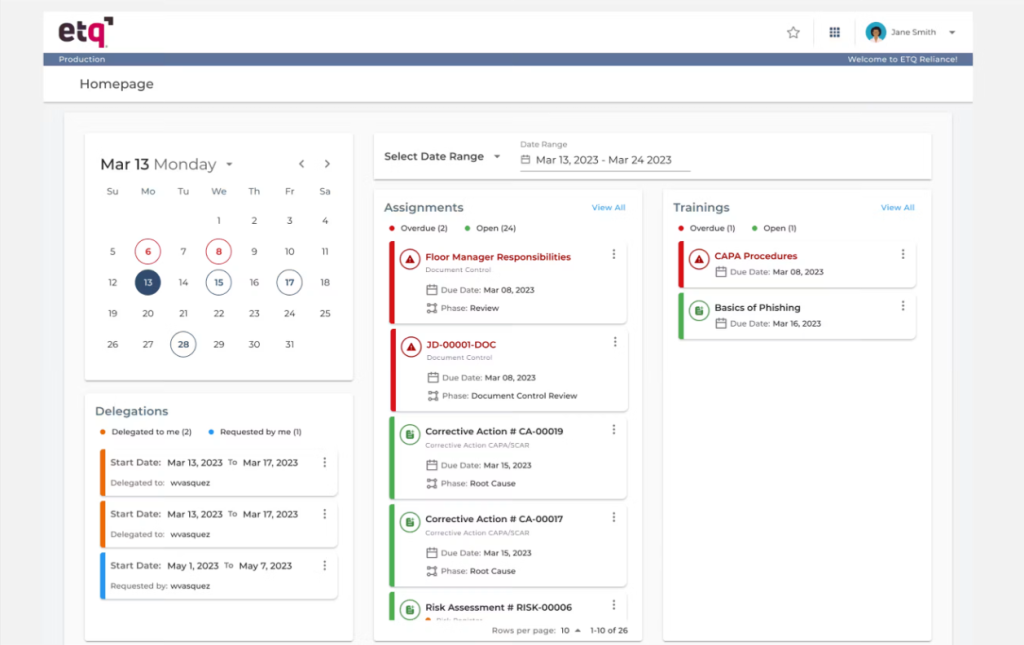
ETQ offers a quality management solution called ETQ Reliance, which is widely used in regulated industries to improve compliance and operational efficiency. The solution allows customization for specific needs, adapting to various sectors and regulatory requirements, and facilitating audits and document management.
Key Features
Integrated Quality Management: Unify various quality management processes, facilitating communication and operational efficiency.
Process Automation: Reduce the time spent on manual tasks through intelligent automation.
Document Management: Store, share, and access important documents quickly and securely.
Customizable Reports: Create detailed reports for better analysis and decision-making.
Risk Management: Identify and mitigate risks, contributing to the continuous improvement of processes.
Pros
Flexibility and Customization: Allow adjustments and customizations according to the specific needs of the business.
Intuitive Interface: Easy to use, with a user-friendly interface.
Cons
High Price: Considered expensive for small and medium-sized companies.
Initial Complexity: It can be complex to set up and implement initially.
Low integration: It doesn’t integrate with many other services and systems.
Pricing
Pricing Model: The starting price is approximately $25k per year, but it can vary depending on the needs and size of the business.
Trial Version: Offers a free trial version for evaluation.
Platform Ratings
Capterra: Average rating of 4.6/5 based on 52 ratings. Users highlight the flexibility but mention the cost as a negative point.
G2: Average rating of 4.3/5 based on 564 reviews. Users praise automation and regulatory compliance but also mention initial complexity as a challenge.
5. DotCompliance
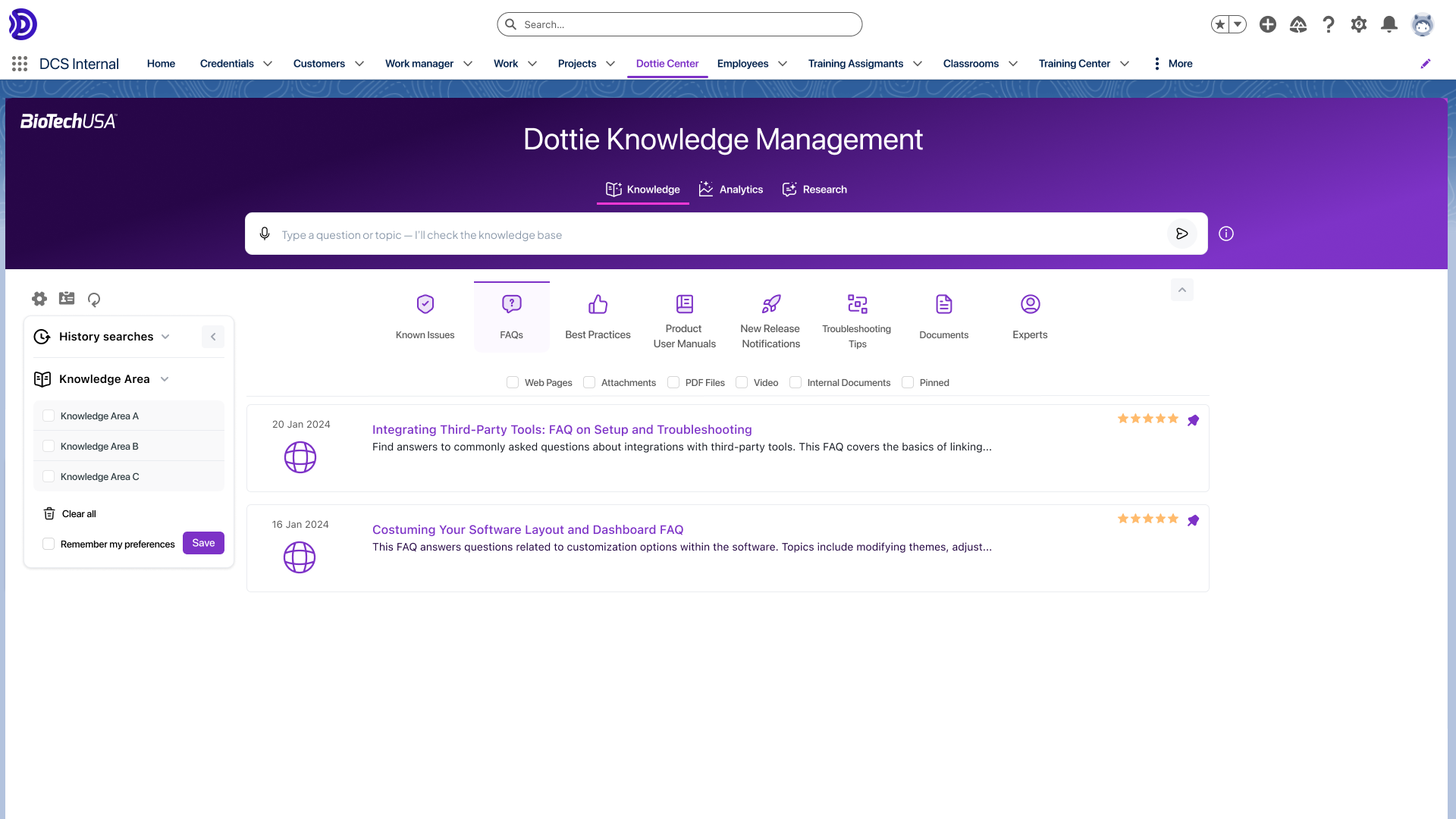
DotCompliance offers a cloud-based electronic quality management system (eQMS) built natively on the Salesforce platform. Its main goal is to streamline quality and compliance processes.
To do this, the platform focuses on centralizing data, eliminating manual paper-based processes, and providing AI-driven insights, especially for highly regulated industries.
Key Features
Document Management: control document versions, maintain audit trails, and manage electronic signatures in a centralized repository.
Quality Management and CAPA: identify, log, and address nonconformities, deviations, and Corrective and Preventive Actions (CAPA).
Training Management: automate the tracking and delivery of employee training to ensure ongoing compliance.
Supplier Management: assess and monitor your suppliers’ quality and compliance metrics.
AI Capabilities: use artificial intelligence to guide quality decisions, automate tasks, and optimize system workflows.
Pros
Centralization: helps eliminate manual processes, spreadsheets, and paper trails by keeping everything in a single system.
Platform Reliability: provides strong security and stability thanks to its native integration with the robust Salesforce ecosystem.
Customer Support: the support team is frequently praised by users for being responsive, friendly, and helpful.
Cons
Learning Curve: The initial setup can be complex and challenging, especially for teams unfamiliar with Salesforce.
Navigation Challenges: Some users find the document search function difficult to use and feel the menus can be a bit confusing.
Rigidity: small customizations or workflow adjustments can be slow and often require assistance from the support team.
Pricing
Pricing Model: pricing is not publicly disclosed and must be negotiated directly with the vendor.
Free Trial: does not offer a free trial.
Platform Ratings
Capterra: average rating of 4.4/5 based on 87 reviews.
G2: average rating of 4.0/5 based on 95 reviews. Users highlight reliable document tracking and excellent customer support, but mention the complex initial setup and navigation difficulties as drawbacks.
6. ComplianceQuest
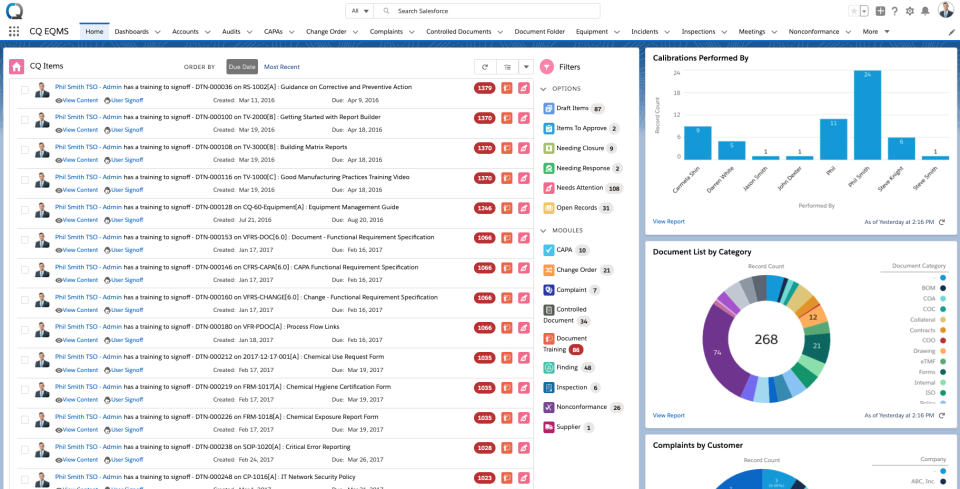
ComplianceQuest offers an integrated, cloud-based Quality, Health, Safety, and Environment (QHSE) solution built natively on the Salesforce platform.
The platform is designed to streamline quality workflows, improve collaboration, and ensure compliance for highly regulated industries by leveraging Salesforce’s standard automation and security capabilities.
Key Features
Document Management: control and centralize documents with approval workflows and audit trails.
CAPA and Complaints Management: provides a structured way to capture details, track case progress, and implement corrective and preventive actions.
Training Management: automate and track employee training and certifications to ensure ongoing compliance.
Supplier and Product Lifecycle Management: monitor supplier performance, reduce supply chain risks, and track product data throughout the manufacturing lifecycle.
EHS Management (Environment, Health, and Safety): manage occupational health and safety protocols, including risk assessments, incident logging, and permits.
Pros
Salesforce Integration: integrates with the Salesforce ecosystem, allowing users to leverage existing workflows, reporting, and role-based security.
Ease of Use: users frequently praise the intuitive interface, noting that it makes document and training management easier to organize and centralize.
Flexibility: offers robust customization options to adapt to the specific quality management processes of different industries and multiple locations.
Cons
Salesforce Dependency: because it is a managed package on Salesforce, certain underlying components and logic are locked, which can limit deep customization without advanced administration expertise.
Implementation Delays: some users report extended timelines during initial setup and note that complex changes or critical bug fixes can take a long time to be resolved by the development team.
Initial Complexity: while day-to-day use is intuitive, setting up detailed tasks and specific workflows involves a learning curve.
Pricing
Pricing Model: although some basic plans start at around US$30 per user/month, enterprise costs are tied to Salesforce licenses and generally require contacting the vendor for a custom quote.
Free Trial: does not offer a standard free trial; interested users must request a demo.
Platform Ratings
Capterra: average of 4.6/5 based on 112 reviews. Users praise the robust functionality and customer support, but mention dependence on Salesforce licenses as a drawback.
G2: average of 4.3/5 based on 81 reviews. Users highlight strong compliance monitoring and seamless platform integration, but note challenges with implementation timelines and locked package features.
7. Ideagen
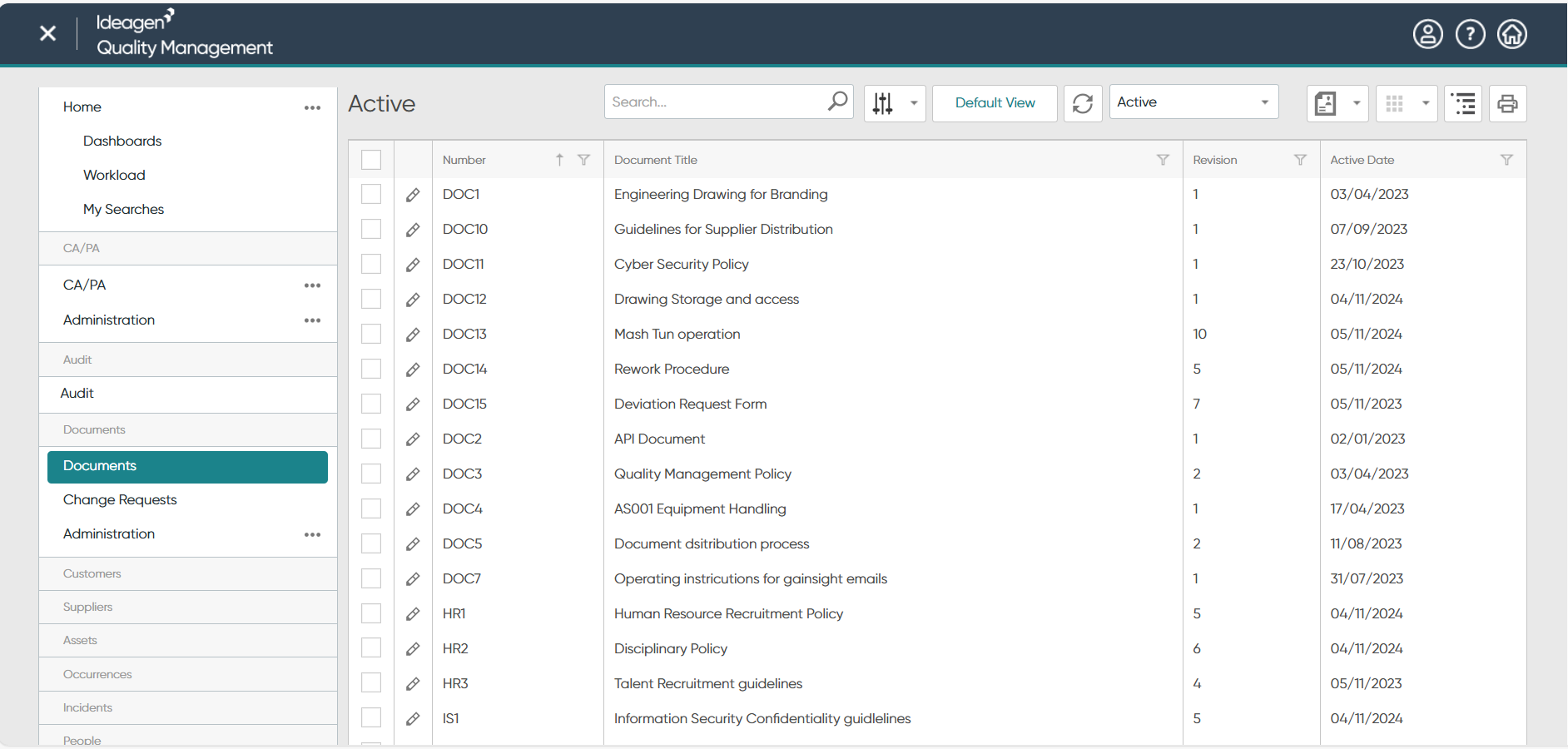
Ideagen Quality Management offers a comprehensive quality and compliance solution tailored to highly regulated industries—such as manufacturing, aviation, healthcare, and life sciences. The platform automates and streamlines business processes, with a focus on standards compliance, risk management, and reducing administrative costs.
Key Features
Document Management: centralize, organize, and manage documents securely using configurable folder structures, version control, and access permissions.
CAPA (Corrective and Preventive Actions): provides a structured workflow to manage, track, and close nonconformities and corrective actions.
Audit Management: plan, schedule, and execute internal and external audits with real-time dashboards to ensure ongoing compliance and reduce audit closure time.
Training and Competency: track employee training matrices, identify knowledge gaps, and manage staff certifications.
Compliance Management: monitor and manage adherence to strict industry policies, safety protocols, and regulatory standards across the organization.
Pros
Document Centralization: the platform keeps evidence and records organized in one place.
Audit Readiness: streamlines the audit process, making it easier to gather evidence for accreditation purposes.
Customization: the software offers flexibility to tailor tasks and modules, adapting to specific business needs.
Cons
Customer Support: many users express frustration with the recent decline in support quality, citing slow responses and a lack of reliable assistance during critical issues.
Outdated Interface: some users find the interface unintuitive, dated, and occasionally confusing—resulting in a cumbersome administration experience and a steep learning curve.
Cloud Migration and Costs: users have noted that recent transitions to the cloud-based SaaS model have led to significant price increases and, in some cases, reduced system speed.
Pricing
Pricing Model: pricing is not publicly disclosed, so you need to contact the vendor for a custom quote.
Free Trial: does not offer a standard free trial for evaluation.
Platform Ratings
Capterra: average of 4.5/5 based on 178 reviews. Users highlight robust document management and audit features, but mention the outdated interface and customer support issues as drawbacks.
G2: average of 4.0/5 based on 485 reviews. Users praise its ability to streamline QMS activities across organizations with multiple sites, but often cite high costs and slow support as challenges.
8. JobBoss
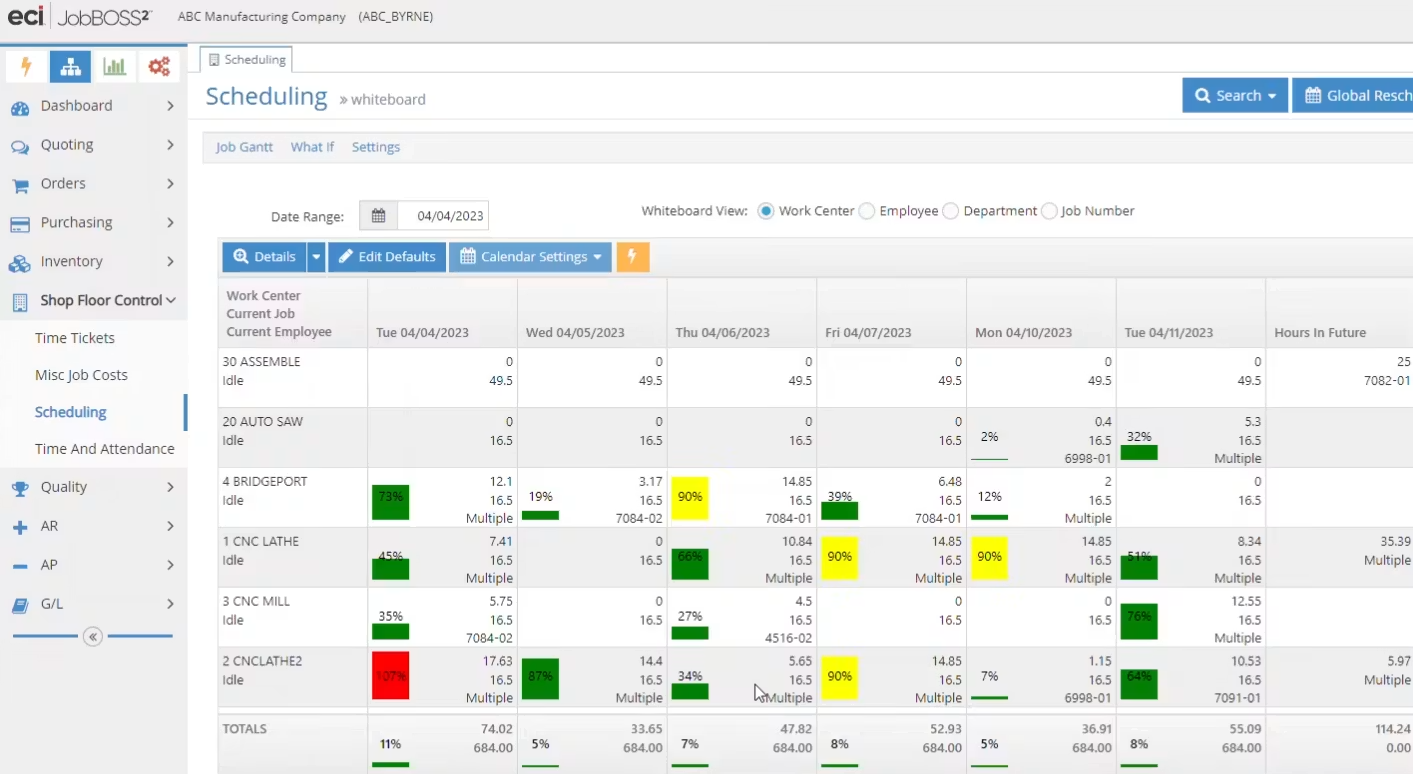
JobBOSS offers a Quality Management System (QMS) designed specifically for small and mid-sized machine shops and custom manufacturers.
Serving as an all-in-one shop floor solution, its dedicated quality module helps businesses manage compliance, track nonconformities, and maintain ISO standards directly aligned with production.
Key Features
Quality Control: manage nonconformities (NC), Corrective and Preventive Actions (CAPA), and automatically generate ISO documentation directly linked to orders.
Estimating and Quoting: convert quotes into orders and track real-time labor, material, and overhead costs.
Production Planning: use a visual scheduling board to monitor machine capacity, identify bottlenecks, and meet customer deadlines.
Inventory and Materials Management: automate material purchasing, track lot and serial numbers, and reduce scrap.
Data Collection: capture real-time shop floor data using barcode scanning and tablets, ensuring accurate task tracking.
Pros
Centralized Workflow: users value the continuous flow of information from quoting to quality control and final invoicing.
Ease of Use: the interface is generally considered intuitive and easy to navigate, with shop floor employees adapting quickly.
Customer Support: the support team is often praised for being knowledgeable, responsive, and helpful during implementation.
Cons
Reporting Flexibility: some users find the built-in reporting tools rigid and difficult to customize without exporting data or purchasing add-ons.
Cost Scalability: while the initial price is reasonable, costs can rise quickly as the business grows and adds users and extra modules.
Accounting Limitations: the native accounting module and its integration with third-party tools like QuickBooks can sometimes be complex or prone to synchronization issues.
Pricing
Pricing Model: pricing is not publicly disclosed, so you need to contact the vendor for a custom quote based on the number of users and modules.
Free Trial: does not offer a standard free trial; interested users must request a demo.
Platform Ratings
Capterra: average of 4.2/5 based on 865 reviews. Users appreciate the comprehensive manufacturing features, but mention rigid reporting and occasional minor software glitches as drawbacks.
G2: average of 3.8/5 based on 56 user reviews. Users highlight real-time cost tracking and strong customer support, but cite a learning curve for accounting integrations and advanced customizations.
Learn more: Everything you need to know to implement a QMS
Read more articles like this:
- What is QMS and How It Can Transform Your Company
- What is Quality Management and its 8 principles
- Quality Management Tools and 7 Trends for 2026

Conclusion
In 2026, the right choice of quality control tools will be crucial for companies looking to optimize their processes and ensure compliance with standards and regulations. The solutions you have learned about offer a wide range of functionalities, from document management and audits to the automation of corrective and preventive actions.
Each software has its own advantages and disadvantages, allowing businesses to choose the one that best suits their specific needs. Thus, you will be able to implement an effective quality management system not only to improve operational efficiency but also to strengthen your company’s reputation in the market.
When considering the available options, it is important to evaluate factors such as ease of use, customer support, cost-effectiveness, and the software’s customizability.
Therefore, it is best to have the only quality management tool that includes several other solutions on a single platform and, in addition, consolidates the needs of all areas on a single platform, reducing costs and providing greater efficiency to the business. To have all this, you can only count on SoftExpert.
Looking for more efficiency and compliance in your operations? Our experts can help identify the best strategies for your company with SoftExpert solutions. Contact us today!
FAQ – Perguntas frequentes sobre os melhores software de gestão da qualidade
Leia as perguntas e respostas mais comuns sobre a temática do artigo:
Quality management software (QMS) is a tool used to ensure products and services meet established quality standards. It helps execute tasks like identifying, monitoring, and correcting problems during the production process, strengthening overall quality management and compliance.
To choose the best QMS, define your specific company needs, check system compatibility, and prioritize essential features. Also, consider ease of use, support quality, cost-benefit, user feedback, and always request a software demonstration or trial before making a final decision.
Essential features include automated inspections, document management, data analysis, internal audits, non-conformance tracking, corrective and preventive actions (CAPA), risk management, and performance indicators (KPIs) to evaluate the overall effectiveness of your quality processes.
The leading quality management systems for 2026 include SoftExpert, Qualio, MasterControl, ETQ, DotCompliance, ComplianceQuest, Ideagen, and JobBoss. Each solution offers specific features, varying focuses, and different capabilities tailored to diverse business and industry needs.
Regulated industries like manufacturing, pharmaceuticals, and finance require QMS software to maintain strict compliance. These tools ensure traceability, streamline audits, and automate document control, minimizing risks and preventing costly regulatory violations.”