Process mapping is the practice of visually representing each stage of an organizational process, from inputs to final products or services. In complex business environments, understanding and organizing workflows is essential. Mapping processes brings clarity to how tasks are connected, showing who does what, when, and with which resources, and makes it possible to identify bottlenecks, redundancies, and opportunities for improvement.
To achieve this goal, a company can use different tools and various types of process mapping in order to find the documentation model that best fits its operations.
Continue reading to discover how to document workflows through diagrams and why these records are important for building a secure and standardized foundation for routines, actions, and decisions.

What is process mapping and what is it used for?
Process mapping is a management method that promotes a better understanding of internal processes. It consists of graphically representing the activities, decisions, inputs, and outputs of a workflow. This allows anyone involved to understand how the process works without the need for extensive explanations.
This visual map can take many forms, ranging from a simple flowchart to complex Business Process Model and Notation (BPMN) diagrams, and is used to document and improve business processes. Within a broader Business Process Management (BPM) framework, these flows help connect business strategy to operational execution.
An effective process diagram illustrates the individual stages of a procedure, highlighting those responsible and the relevant timelines. As a result, stakeholders at different levels understand the requirements, execute them effectively, and may even identify areas for improvement.
In short, process mapping helps standardize operations, improve internal communication, and create a starting point for future strategic optimizations.

What are the benefits of process mapping?
Mapping a company’s processes brings tangible benefits to the daily work of those who perform tasks and, in addition, to the organization’s overall business strategy. Among the main gains this practice provides are:
Operational efficiency
Representing a process from end to end makes it possible to identify bottlenecks and eliminate unnecessary tasks. By removing redundancies and optimizing steps, workflows become much faster and more productive. In some cases, adopting mapping tools with BPMN modeling can reduce time spent on critical stages by up to 80%.
Standardization and control
Process mapping helps clearly define who does what and in what order, ensuring that everyone follows consistent procedures. This increases quality and compliance while reducing errors, rework, and risks. In addition, documenting each step facilitates internal and external audits, supporting governance and compliance with standards such as ISO 9001, for example.
Improved communication
Process diagrams provide a shared visual language that is globally understood and designed for quick comprehension. By making activity flows and responsibilities explicit, teams better understand how their tasks connect to others, as well as which stages have been completed and which are still ahead. As a result, there are fewer misalignments between departments and less time spent on coordination, making meetings and training sessions more efficient.
Visibility and data analysis
Modern process mapping tools are often integrated with other systems and collect real-time data. This gives managers detailed insight into operations, enabling them to monitor performance indicators and make more informed decisions. With the right solution, it is possible, for example, to analyze cycle times and costs associated with each stage to determine where investments will generate the greatest value.
Continuous improvement
When working with mapped processes, the PDCA cycle becomes more objective. With documented workflows, teams can regularly review the entire process and use feedback to implement adjustments quickly. In this way, mapping moves beyond being a one-time activity and becomes part of a continuous improvement culture that sustains long-term gains.
It is worth noting that all these benefits are interconnected. In other words, process mapping promotes standardization, which helps identify vulnerabilities, facilitates improvements, and drives efficiency, creating a virtuous cycle. Together, these effects lead to more capable teams, higher customer satisfaction, and lower operating costs.
What are the main types of process mapping?
There are several ways to represent processes, each suited to different situations. To define the best option for your company, it is first necessary to understand the characteristics of each mapping method and then analyze which one best fits your operational needs.
The main ways to map processes are:
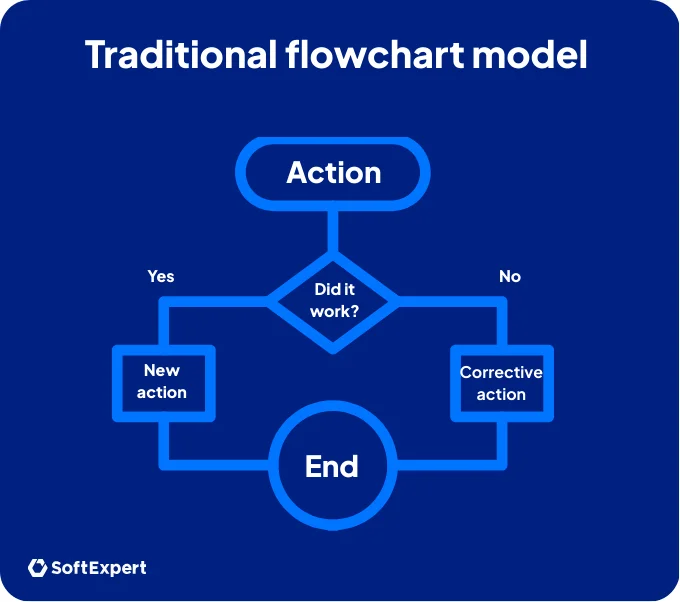
Traditional flowchart
The most common approach is to use a basic diagram with rectangles to represent activities and arrows to indicate the flow. This method is ideal for showing the step-by-step progression of a process from start to finish. However, because it is more limited, it is better suited for simple projects or for introducing teams to process mapping.
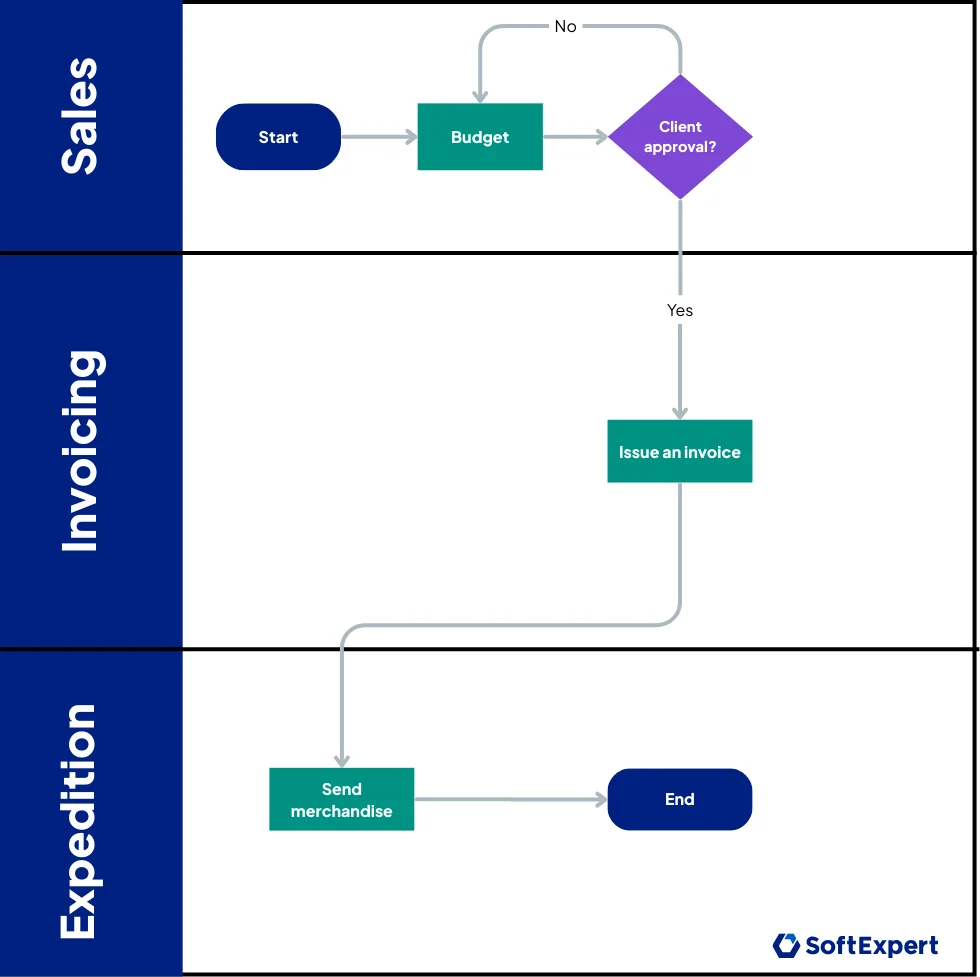
Cross-functional flowchart
This model shows the same process flow, but divided into “lanes” or vertical sections, with each lane representing a department or a responsible person. The main advantage of this format is that it highlights who does what and how information moves from one area to another. This makes it easier to train employees in their roles and identify interdepartmental delays, for example.
High-level map
This type of mapping presents only the essential elements of a process, such as suppliers, inputs, process, outputs, and customers, in a top-down view. It is useful for summarizing complex processes, serving as a prerequisite for more detailed documentation, or communicating scope to executives who only need to understand the most critical aspects.

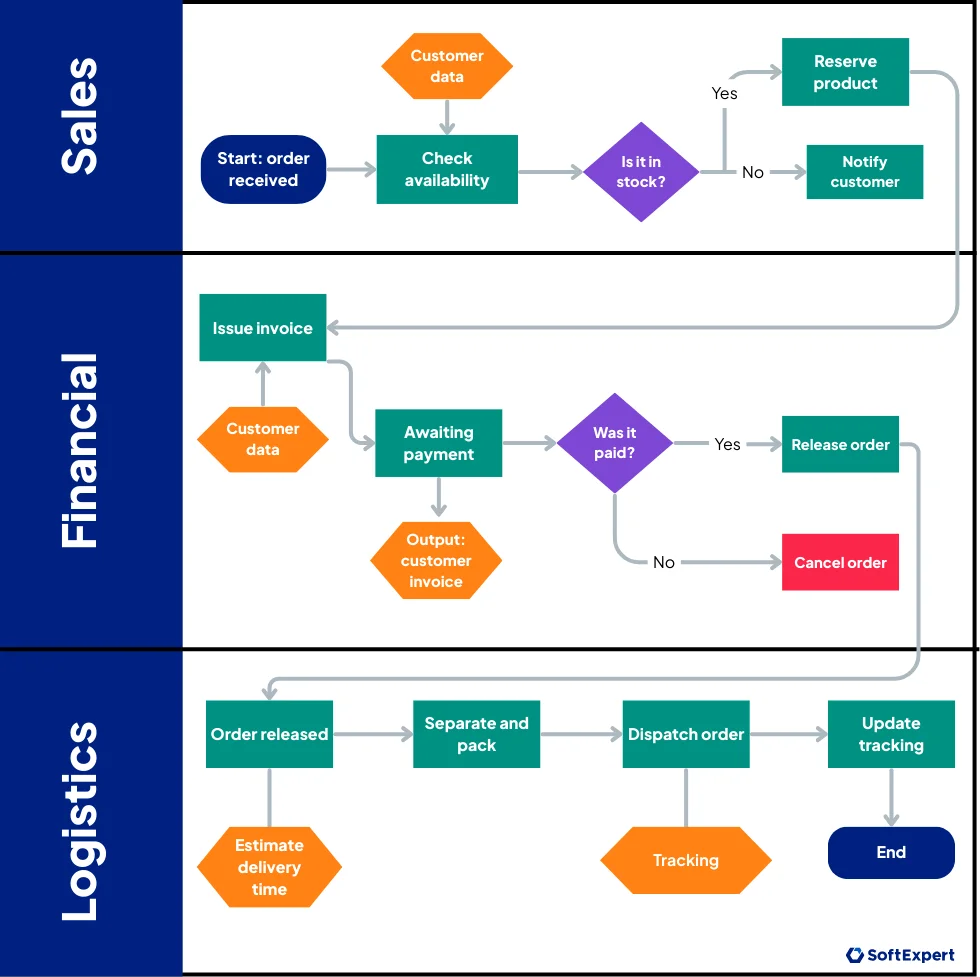
Detailed process map
This format depicts all stages and subprocesses, including decision points and attributes such as inputs, outputs, and responsible parties. This more granular model is effective for in-depth analysis, as it accurately reveals where inefficiencies or risks are located. For this reason, companies often use detailed maps to redesign critical processes or automate key operational activities.
Value stream map
This map originated in the Lean methodology and focuses on the flow of materials and information required to deliver a product or service to the customer. It typically includes specific symbols to represent indicators such as cycle time and involved personnel. Because of its Lean origins, it is ideal for waste reduction initiatives, as it helps visualize where value is added and where hidden waste exists.
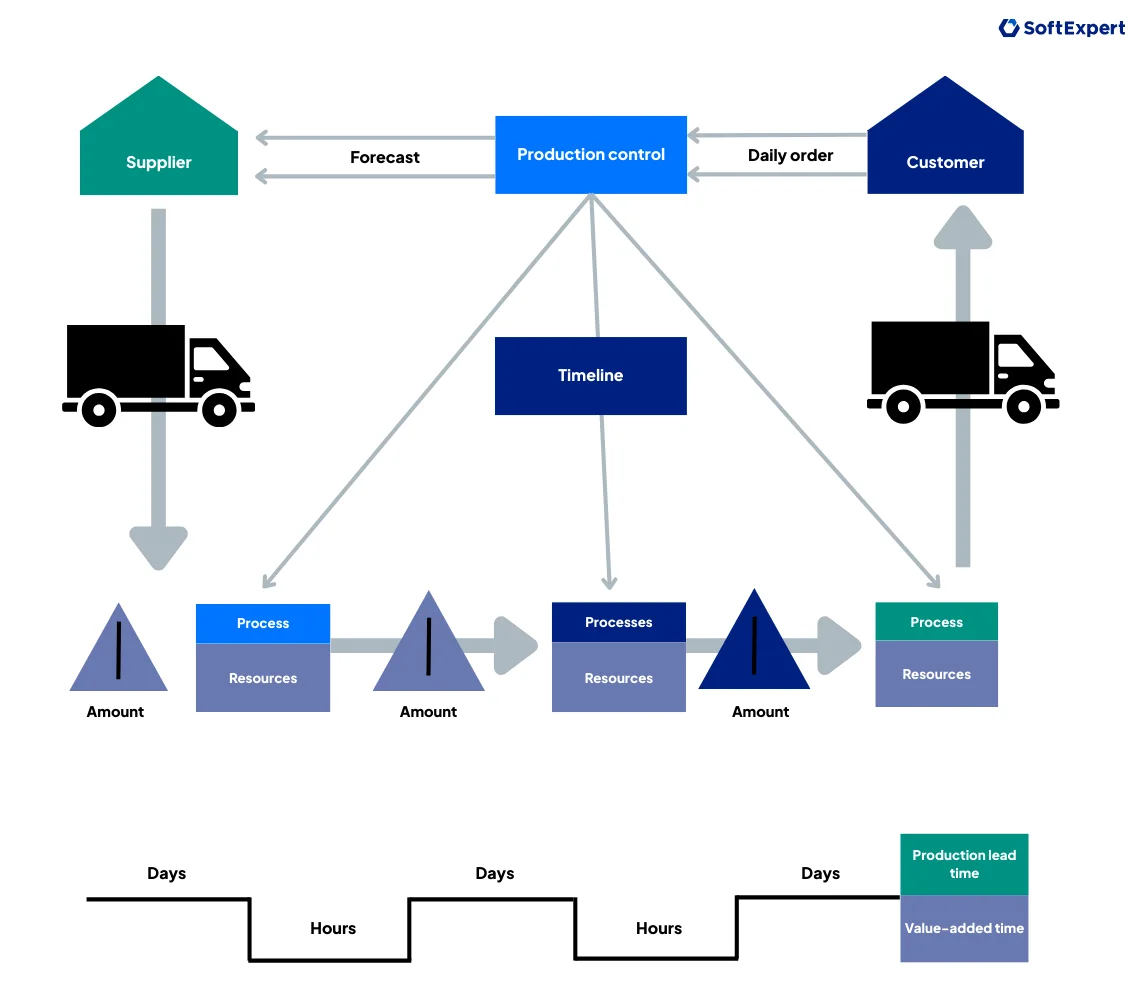
Each type of process map serves a specific purpose and has distinct characteristics. For example, high-level maps facilitate strategic alignment, while cross-functional flowcharts support collaboration between teams. Therefore, to find the most suitable option for your company, consider the results you want to achieve and the characteristics of the process to be mapped.
Continue reading: BPMS – Discover what it is and how to implement it in your business
What is process mapping with BPMN?
In addition to choosing the appropriate process mapping model, it is also essential to maintain consistency, clarity, and standardization across all maps, regardless of their type. To achieve this, a best practice is to use a recognized graphical notation, with BPMN being the most widely adopted.
It is an internationally recognized visual standard that defines specific symbols to represent events, tasks, decisions, and other process elements. Thanks to this standardization, technical and business teams can easily read the same diagram, even in multicultural environments.
This graphical representation is created through icons, lines, and symbols that visually, quickly, and intuitively show how a process unfolds. In this way, each geometric shape, such as circles, rectangles, and diamonds, represents a type of action or event in the process, while each line shows how each step progresses, making the map highly precise.
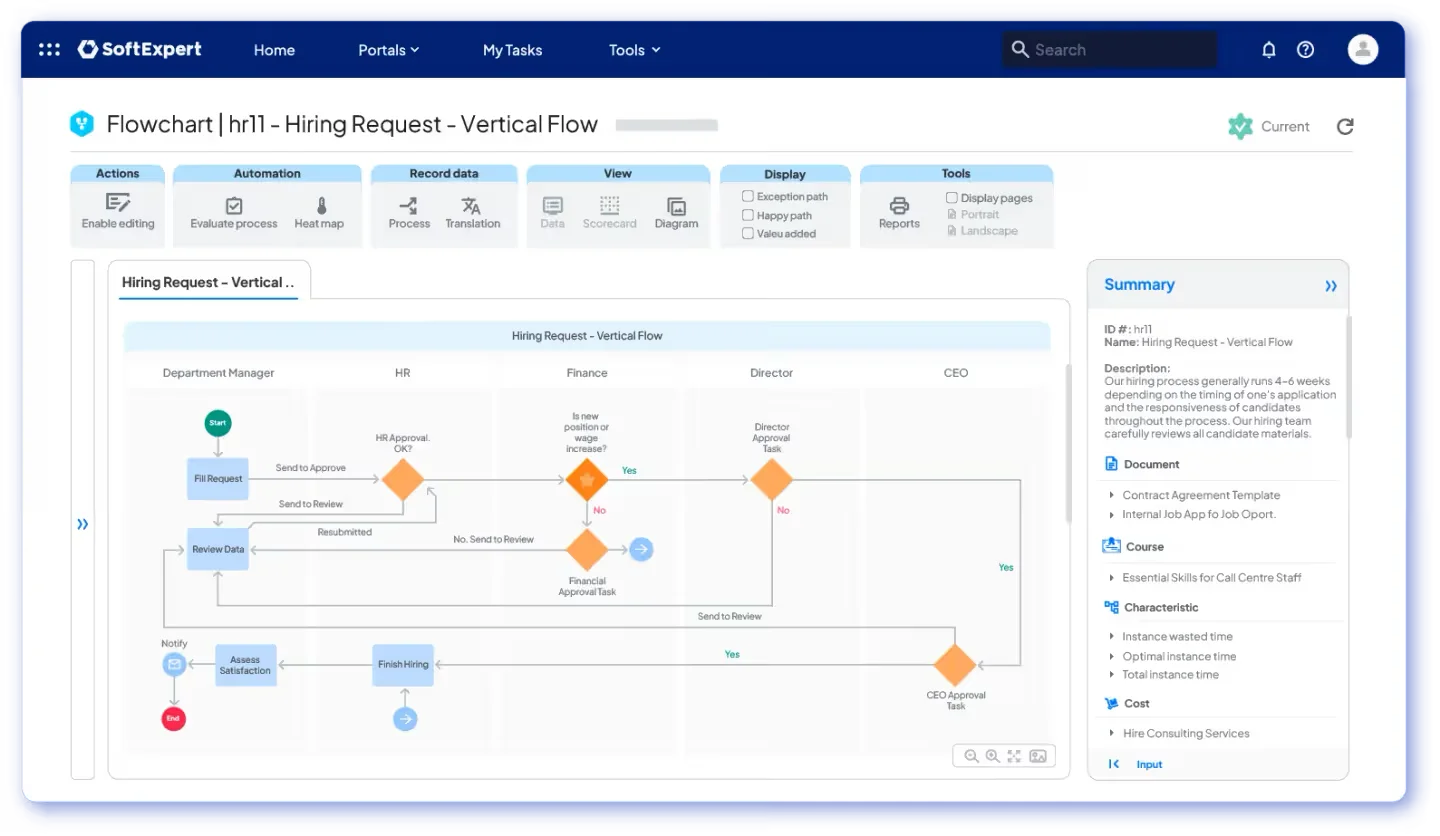
Among the main advantages of using BPMN in process mapping are:
- designing complex processes with clear and standardized rules;
- making actions easier to understand for suppliers and customers, as it uses a widely recognized notation language;
- enabling direct automation in process management platforms.
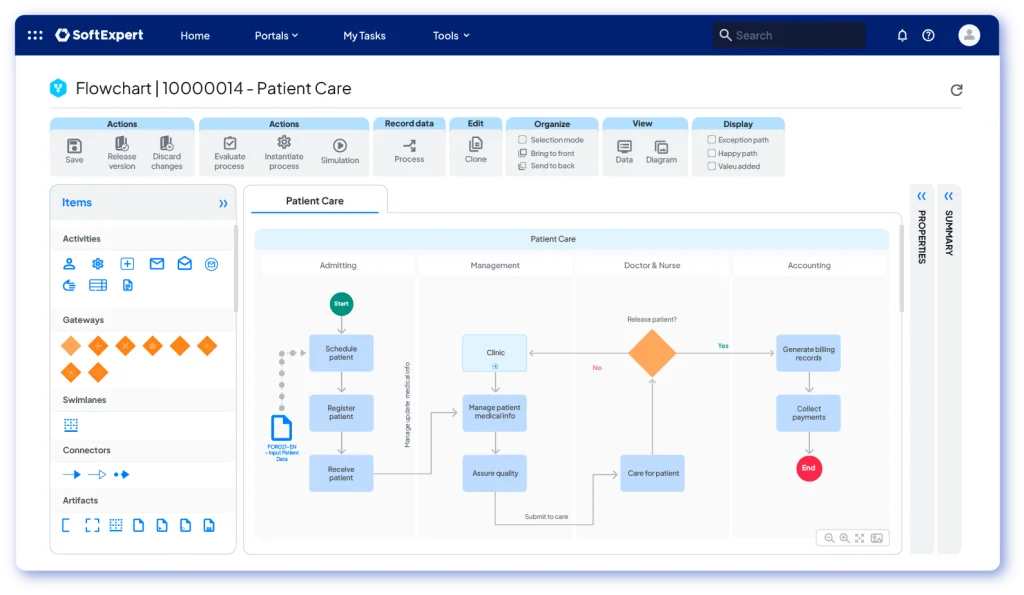
BPMN allows organizations to diagram subprocesses, exceptions, and events in a richer way than generic or simpler flowcharts. For this reason, using this notation increases transparency and standardization in process models and prepares companies to modernize their systems, since many software solutions are compatible with this standard.
What are the tools for process mapping?
To make process mapping and management easier, there are numerous tools available, ranging from simple graphic editors to complete Business Process Management (BPM) suites. Free or lightweight tools, such as Miro, help create basic flowcharts and BPMN diagrams.
Specialized BPM platforms, on the other hand, offer collaborative modeling, automation, and process monitoring, bringing design, execution, and analysis together in a single environment.
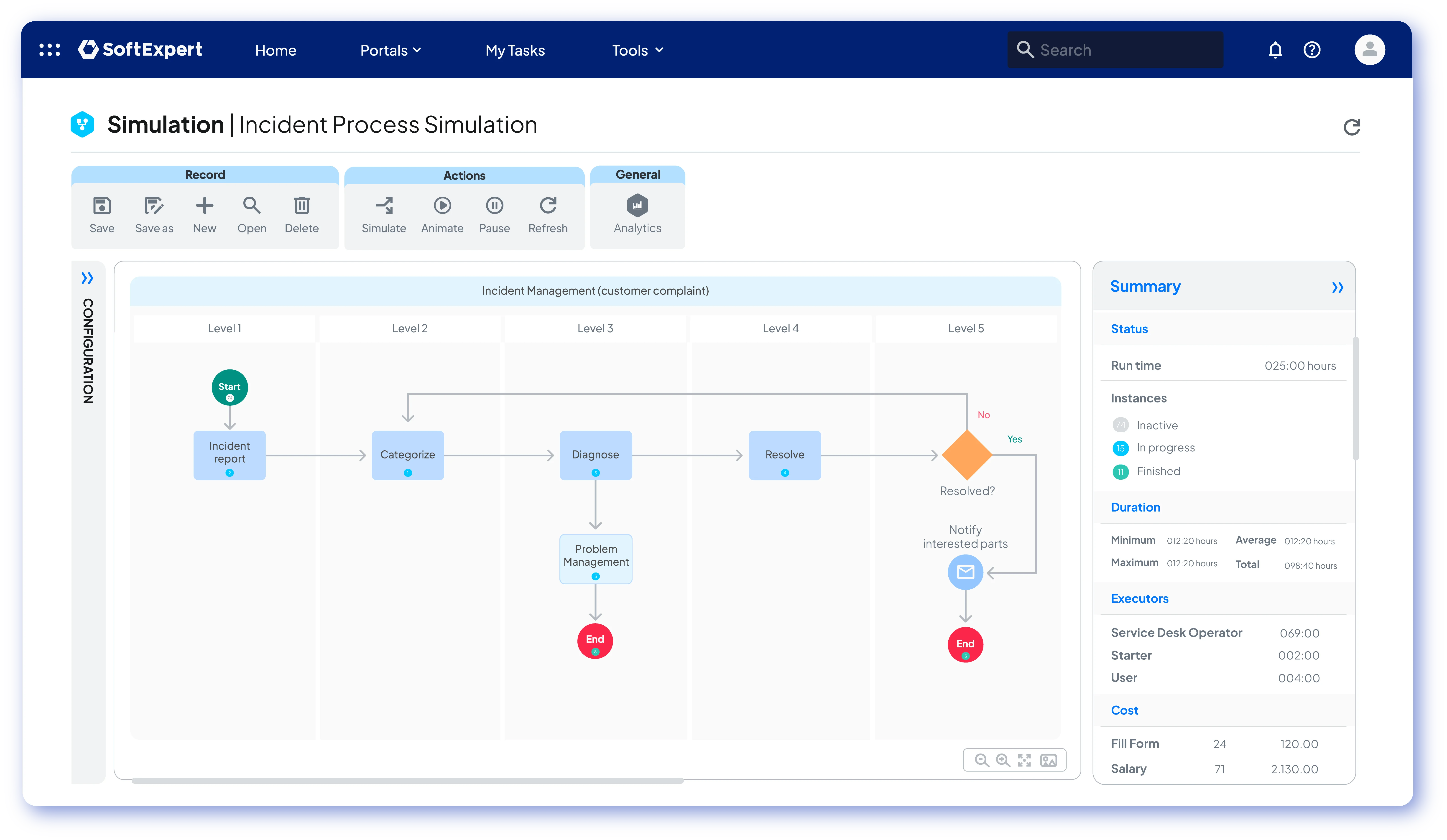
An example of a more robust solution is the combination of the Process module and SoftExpert BPM, which provides a platform focused on business process management, integrating BPMN modeling, automation, visual analysis, and governance into a unified approach.
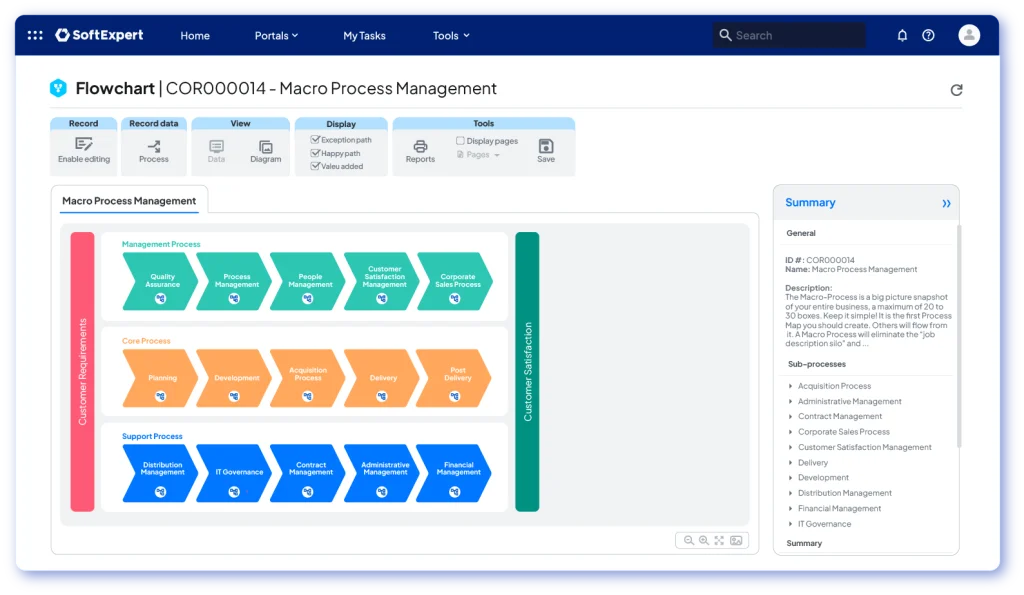
With this technology, the tool offers a user-friendly graphical environment for drawing flowcharts, defining business rules, and simulating workflows, all integrated with the company’s broader corporate governance structure.
In addition to these solutions, there are other process mapping tools designed for different profiles:
- Bizagi Modeler, for example, is popular for free BPMN mapping;
- Pipefy and ClickUp offer workflow management features;
- SAP Signavio and Appian are options for large-scale projects.
The choice of tool depends on the size of the company and the complexity of the process. Regardless of this, it is worth noting that investing in process mapping applications generates strategic returns, as they not only facilitate flow documentation but also integrate data from different systems to track performance indicators in real time.
In summary, process mapping tools range from simple spreadsheets to complete BPM systems, but all share the same goal: documenting, analyzing, and improving business processes. In the case of SoftExpert BPM, for example, companies also benefit from advanced modeling features, including full BPMN support and collaboration tools, which accelerate the implementation of effective process management.
How to create a process map?
To create an efficient process map, you must first define what you want to map, which aspects need to be documented, the results you expect to achieve, such as reducing execution time or avoiding waste, and the tool and modeling method to be used.
Then, you can follow the basic structure below to begin the mapping process:
1. Define the process scope
Choose a specific process to be mapped, preferably one that has a significant impact on the business or currently presents issues. Then identify the objective of the process, which may be simply to document the current flow or to propose an optimized future flow.
2. Gather information from experts
Invite people who are familiar with the process, preferably managers and operators, to describe each activity. Collect all tasks, responsible parties, required inputs, and outputs for each stage, and list all steps and their owners in any order. Then determine where the process starts and where it ends.
3. Organize the steps in sequence
With the list prepared, arrange the activities in the correct order from beginning to end, forming a logical flow. Check that no steps are missing and eliminate any duplications. This alignment makes it easier to clearly see how the process works and prepares the foundation for the diagram.
4. Draw the flowchart or diagram
With the steps sequenced, visually represent the process: use boxes, such as rectangles, for activities and arrows for flow, or BPMN symbols if that notation is adopted. Represent decisions with diamonds, start and end points with ellipses, and other standard symbols. To facilitate this stage, use mapping software. In the first version, keep the diagram simple, including only essential elements, and refine it later.
5. Review and share the map
Before finalizing, validate the diagram with the team by presenting the proposed flow and adjusting it based on feedback. Make sure everyone understands the map and agrees that it is complete and free of redundancies. This step is essential to avoid misinterpretation and ensure that the process map accurately reflects the company’s reality.
6. Analyze and optimize
With the map approved, use it as a continuous improvement tool. Examine each stage to identify opportunities: are there bottlenecks, activities that can be automated, or steps that can be eliminated? Test scenarios, propose improvements, and redesign the enhanced process. With each improvement implemented, update the map so it does not become outdated and continues to support a culture of optimization.
Finally, remember that the mapping process does not end with drawing the diagram itself. It is essential to use the map for analysis and improvement, integrating it into the company’s strategic review cycles.
Read more – 9 best BPM software: what are they and how to choose?
Read more articles like this:
- What is process management and what advantages does it bring to your business?
- How to optimize processes using continuous improvement methodologies
- 6 steps to improve business process management
Conclusion
Process mapping is much more than simply drawing a company’s workflows. It is a strategic practice that supports decision-making, resource optimization, and organizational innovation. By mapping activities, companies gain a deep understanding of how they operate, enabling them to identify improvements based on solid evidence and align teams around shared objectives.
In this way, process mapping delivers gains in efficiency, quality, and competitiveness, especially when combined with continuous improvement methodologies and standardized notations such as BPMN.
Ultimately, process mapping is the foundation for achieving operational excellence. With a clear view of activities and proper governance, organizations can act proactively on risks, empower teams through shared knowledge, and, above all, deliver better products and services to customers. As a result, each mapped step becomes a move toward smarter and more reliable management.

FAQ on Process Mapping
Process mapping is a management practice that consists of visually representing each stage of a workflow, from initial inputs to the final product or service.
Its purpose is to provide clarity on how tasks are connected, defining who does what, when, and with which resources. It allows anyone to understand how the process works without the need for extensive explanations.
Process mapping generates benefits for both daily operations and business strategy, including:
– Operational efficiency: it allows organizations to identify bottlenecks, remove redundancies, and eliminate unnecessary tasks, making workflows faster. The use of BPMN modeling can reduce time in critical stages by up to 80%.
– Standardization and control: it clearly defines task order and responsibilities, ensuring compliance, reducing errors, and facilitating audits, such as ISO 9001.
– Improved communication: it creates a common visual language that reduces misunderstandings between departments and makes meetings and training sessions more efficient.
– Continuous improvement: it facilitates the use of the PDCA cycle, enabling regular reviews and quick adjustments based on feedback.
The choice of model depends on operational needs. The main types include:
– Traditional flowchart: uses rectangles and arrows to show step-by-step activities; ideal for simple projects.
– Cross-functional flowchart: divides the flow into “swimlanes” to highlight departments or responsible parties, making information exchange between areas easier to visualize.
– High-level map: presents only essential elements, offering a macro view for strategic alignment or executive communication.
– Detailed map: draws all stages, decisions, and attributes with granular precision to identify deep inefficiencies.
– Value stream map: focuses on the flow of materials and information to identify where value is created and where waste exists, originating from Lean methodology.
BPMN (Business Process Model and Notation) is an internationally recognized visual standard that uses specific symbols to represent events, tasks, and decisions. It ensures that technical and business teams can easily read the same diagram, standardizes rules, and enables direct automation on management platforms. BPMN uses icons, such as circles, rectangles, and diamonds, along with connecting lines to visually represent how each stage unfolds.
Adopt a basic step-by-step structure:
–Define the scope: choose a process that impacts the business and determine whether the goal is to document the current flow or propose a new one.
– Gather information: consult experts, such as managers and operators, to list tasks, responsibilities, inputs, and outputs.
– Organize the sequence: arrange activities in logical order from start to finish and eliminate duplications.
– Draw the diagram: visually represent the process using symbols, such as boxes, arrows, and diamonds, or BPMN notation.
– Review and share: validate the diagram with the team to ensure it reflects reality and avoids misinterpretation.
– Analyze and optimize: use the approved map to identify bottlenecks and automation opportunities, updating it with each improvement.
Tools range from simple options to complete Business Process Management suites. You can use software such as Miro or Bizagi Modeler to create basic flowcharts, or platforms such as SoftExpert BPM for collaborative modeling, automation, integration with corporate governance, and real-time data analysis.
Looking for more efficiency and compliance in your operations? Our experts can help identify the best strategies for your company with SoftExpert solutions. Contact us today!